When you request mailbox deletion in Primeforge, the mailbox is scheduled for deletion rather than removed immediately.
After requesting deletion:
The mailbox status changes to Scheduled for deletion.
You can hover over this status to view the scheduled deletion date.
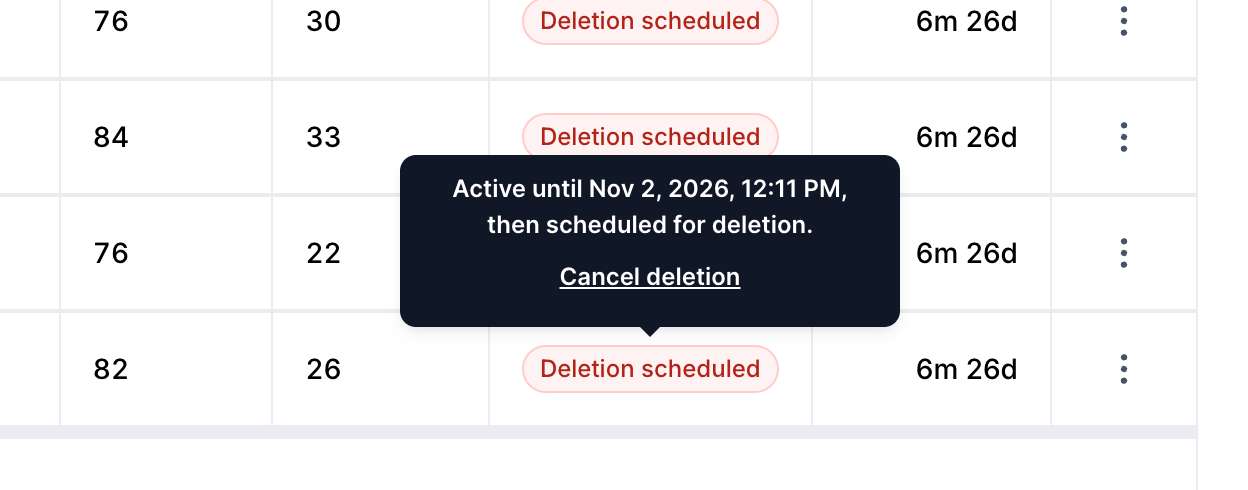
The mailbox remains in its scheduled-for-deletion state until that date.
Once the deletion takes effect, the mailbox is removed from your account and its associated mailbox slot becomes available for reuse, subject to your account's slot allocation.
If your account has 10 mailbox slots and you delete one mailbox:
The mailbox is marked Scheduled for deletion.
The mailbox remains in your account until the scheduled deletion date.
Once deletion takes effect, the mailbox is removed.
The slot associated with that mailbox becomes available for reuse.
Important: Deleting a mailbox does not immediately reduce your total mailbox slot allocation or subscription capacity.
Mailbox slots represent the capacity available under your Primeforge subscription. Reducing the number of slots is a separate action from deleting individual mailboxes.
When you reduce your mailbox slot allocation:
Your requested slot reduction is handled separately from mailbox deletion.
Reducing the slot allocation does not automatically delete individual mailboxes immediately.
The effective timing of the slot reduction depends on the applicable subscription and billing terms.
Before reducing your slot allocation, make sure the remaining capacity is sufficient for the mailboxes you intend to keep.
Note: Reducing your mailbox slot allocation and deleting mailboxes are separate operations. Do not assume that deleting a mailbox automatically reduces your subscription's allocated slot count.
These actions serve different purposes:
Deleting a mailbox
Schedules an individual mailbox for deletion.
Keeps the mailbox in its scheduled state until the deletion date.
Removes the mailbox when the scheduled deletion takes effect.
Reducing mailbox slots
Changes the mailbox capacity allocated to your subscription.
Is handled separately from deleting individual mailboxes.
Takes effect according to the applicable subscription and billing terms.
If a mailbox displays Scheduled for deletion, hover over the status to view the scheduled deletion date.
This date indicates when the mailbox deletion is expected to take effect. It should not be confused with the timing of a subscription slot reduction.
Primeforge mailboxes are real Google Workspace or Microsoft 365 mailboxes, so a suspension can come from Google or Microsoft as well as from Forge. Here is what to expect:
Suspended by Forge or Warmforge: support first looks for the cause, such as bounces, a blacklist listing, a parked domain or incorrect DNS records. Once it is fixed, contact support through live chat to have the mailbox unsuspended. See Why Warmforge Suspends Mailboxes. If the domain itself is suspended because the contact email is not verified, see Verify your domain contact email.
Suspended by Google or Microsoft: the provider decides whether the mailbox is restored. Support can check the status, but cannot override the provider's decision, and a review can take a long time or end with the mailbox staying restricted. The domain is not necessarily affected, so you can still create new mailboxes on it, but a new mailbox is not guaranteed to avoid the same restriction.
Replacing a mailbox: delete the affected mailbox. Once the deletion takes effect, its slot is free and you can create a new mailbox in it at no extra cost. Because deletion is scheduled first, the slot is not available immediately.
Replacing a domain: if a domain is burned and recovery is not realistic, retire it and purchase a new one. See How to recover a burned domain.
Refunds and credits: a blocked or suspended mailbox or domain does not entitle you to a refund, credit or compensation. The billing policy applies as written, see Cancellation Process, Subscription Renewals, Invoices & Refunds.
Not paying for mailboxes you won't use: a mailbox scheduled for deletion still counts towards your plan until the deletion takes effect, so delete suspended mailboxes you no longer need before your next renewal. Then reduce your slots if you don't need the capacity, see How to reduce mailbox slots.
No. The mailbox is scheduled for deletion first. Once the deletion takes effect, the mailbox is removed and its slot becomes available for reuse.
No. Deleting a mailbox and reducing your subscription's slot allocation are separate actions.
The hover-over date applies to a mailbox displaying Scheduled for deletion. It should not be used to determine the effective date of a subscription slot reduction.
Review your existing mailboxes and the capacity you need before changing your allocation. Make sure your intended mailbox setup is compatible with the remaining capacity and applicable subscription terms.
Support helps find and fix the cause where it is on our side. If the mailbox cannot be restored, delete it and create a new one in the freed slot at no extra cost. Refunds, credits or compensation are not issued for suspended or blocked mailboxes or domains.
Mailbox deletion: The mailbox is scheduled for deletion and removed when the scheduled action takes effect.
Mailbox slot reduction: A separate action that changes your subscription's allocated capacity.
Scheduled deletion date: Available by hovering over the Scheduled for deletion status on the mailbox.
Mailbox deletion and subscription slot management are distinct operations. Understanding the difference helps you manage your Primeforge mailboxes and subscription capacity correctly.
