
Having trouble connecting a mailbox or sending emails using a domain you recently purchased on Mailforge?
One possible reason is that the registrant contact email address for your domain has not been verified yet.
When you purchase domains through Mailforge, a verification email is sent to the contact email address you entered during the purchase. This verification is required to keep the domains active.
Where is the verification email sent?
The verification email is sent to the contact email address you entered when purchasing the domains.
This may be different from the email address you use to log in to Mailforge.
If the same contact email address is used for multiple domains, you only need to verify it once. Verifying that email address will verify and un-suspend all domains associated with it.
If your domains use different contact email addresses, each contact email address only needs to be verified once for the domains associated with it.
Any future domains purchased with an already verified email address, will not have to be verified again.
Why is verification required?
Domain registrars require the registrant contact information for newly registered domains to be verified.
For newly registered domains, the contact email normally needs to be verified within 14 days. If it is not verified within that period, the domains may be suspended.
What happens when a domain is suspended?
When a domain is suspended because its contact email has not been verified, its normal DNS configuration is temporarily replaced.
This can affect services using the domain, including mailboxes.
You may notice things such as:
A mailbox becoming disconnected
Being unable to connect a mailbox
Emails failing to send
A domain or mailbox that was previously working suddenly stopping
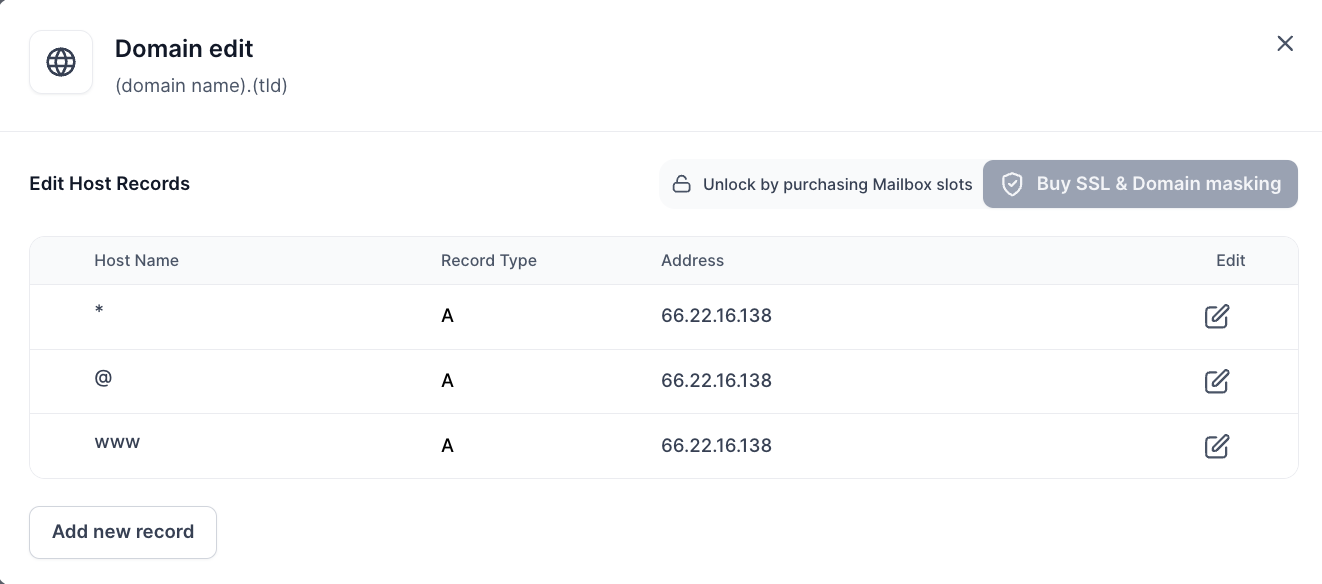
There won’t be a direct notification of the domain getting suspended in case the contact details are not verified on time. One of the easiest ways to confirm whether your domain has been affected by this suspension is to check its DNS records.
When suspended, a domain’s existing DNS records are replaced with three A records, as shown below:
How do I fix it?
Find the verification email sent to the contact email address you used when purchasing the domain and follow the verification link.
Once the email address is verified, the domain will be restored automatically.
You do not need to recreate the domain or manually replace its DNS records. In most cases the domain will return to its normal state right away.
I didn't receive the verification email
First, check the Spam, Junk, or other filtered folders in the contact email inbox.
The verification emails are sent automatically, and depending on the email provider, automated messages can sometimes be filtered away from the main inbox.
If you still can't find the email, contact us through the live chat and we can resend the verification email.