Self-managed DNS is available on Infraforge only. It lets you keep your own nameservers and manage DNS records yourself at your registrar or DNS provider (for example Cloudflare), instead of pointing your nameservers to Infraforge.
Normally, when you connect a domain you bought elsewhere, you point its nameservers to Infraforge. Infraforge then hosts your DNS and keeps your records up to date for you.
With self-managed DNS:
Your nameservers stay with your current registrar or DNS provider.
You copy the DNS records shown in your Infraforge account (MX, SPF, DKIM, DMARC, and any others listed) and add them at your registrar.
You are responsible for keeping those records correct and up to date.
Standard (nameservers on Infraforge) | Self-managed DNS | |
|---|---|---|
Where DNS is hosted | Infraforge | Your registrar or DNS provider |
Nameservers | Must point to Infraforge | Stay with your provider |
Who updates DNS records | Infraforge | You, manually, at your registrar |
Self-managed DNS applies to connected domains only (domains you bought elsewhere and connected to Infraforge).
It is set up for each domain separately. If you connect another domain later and want it self-managed too, you need to ask for it again for that domain.
The DNS records shown in Infraforge are a reference only for these domains. Your domain works only when the same records are live at your registrar.
If a record is missing or outdated at your registrar, your email sending can be affected.
Self-managed DNS is not turned on from your dashboard. Our support team enables it for you, one domain at a time.
Open the live chat in your Infraforge account.
Tell our support team which domain(s) you want to use with self-managed DNS.
Confirm in the chat that you understand and accept that you are responsible for copying the DNS records from Infraforge to your registrar and keeping them up to date.
Our team will enable it for your domain(s) and let you know once it is done.
After self-managed DNS is enabled:
Open your domain in your Infraforge account and go to its DNS records.
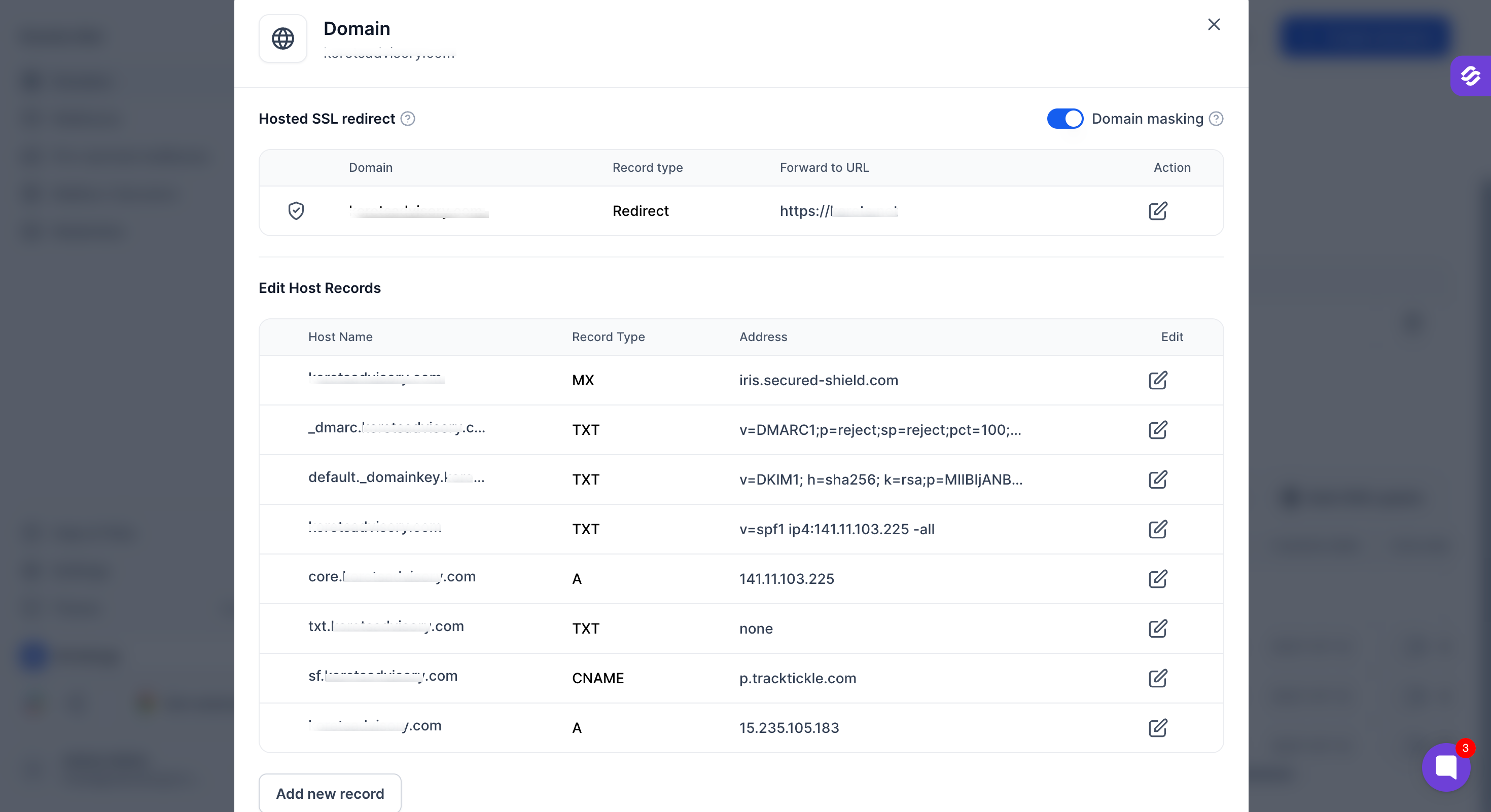
Copy every record shown (MX, SPF, DKIM, DMARC, and any others) exactly as it appears.
Log in to your registrar or DNS provider and add the same records there.
Wait a few minutes, then check that the records are live using a tool such as MXToolbox.
Check your DNS records in Infraforge and update them at your registrar every time you:
Create new mailboxes on the domain.
Change anything related to the domain in Infraforge.
If you see a message about invalid nameserver configuration on a self-managed domain, you do not need to change your nameservers. Reach out to our support team through live chat and we will help.
A DNS record shows as missing on a tool like MXToolbox, but it appears in Infraforge.
This usually means the record has not been added to your registrar yet, or it does not match what Infraforge shows. Add or correct the record at your registrar so it matches exactly, then check again after a few minutes.
If you have any questions about self-managed DNS, reach out to our support team through the live chat and we will be happy to help.