The Forge Stack is a collection of tools designed to cover the entire outbound sales process, from finding the right prospects to sending outreach, managing replies, and generating pipeline.
Instead of stitching together multiple disconnected tools, you can use the Forge Stack to manage your prospecting, email infrastructure, deliverability, outreach, and AI-powered sales development in one ecosystem.
The Forge Stack includes:
Leadsforge for finding and enriching leads
Mailforge for shared email infrastructure
Infraforge for private email infrastructure
Primeforge for Google Workspace and Microsoft 365 mailboxes
Warmforge for email warm-up and deliverability monitoring
Salesforge for multi-channel outreach and sales execution
Agent Frank for autonomous AI-powered prospecting and outreach
Salesforge MCP and API for connecting the Forge Stack to your own workflows and applications
You do not need to use every product. Each product solves a different part of the outbound process, so you can use only the parts that fit your workflow.
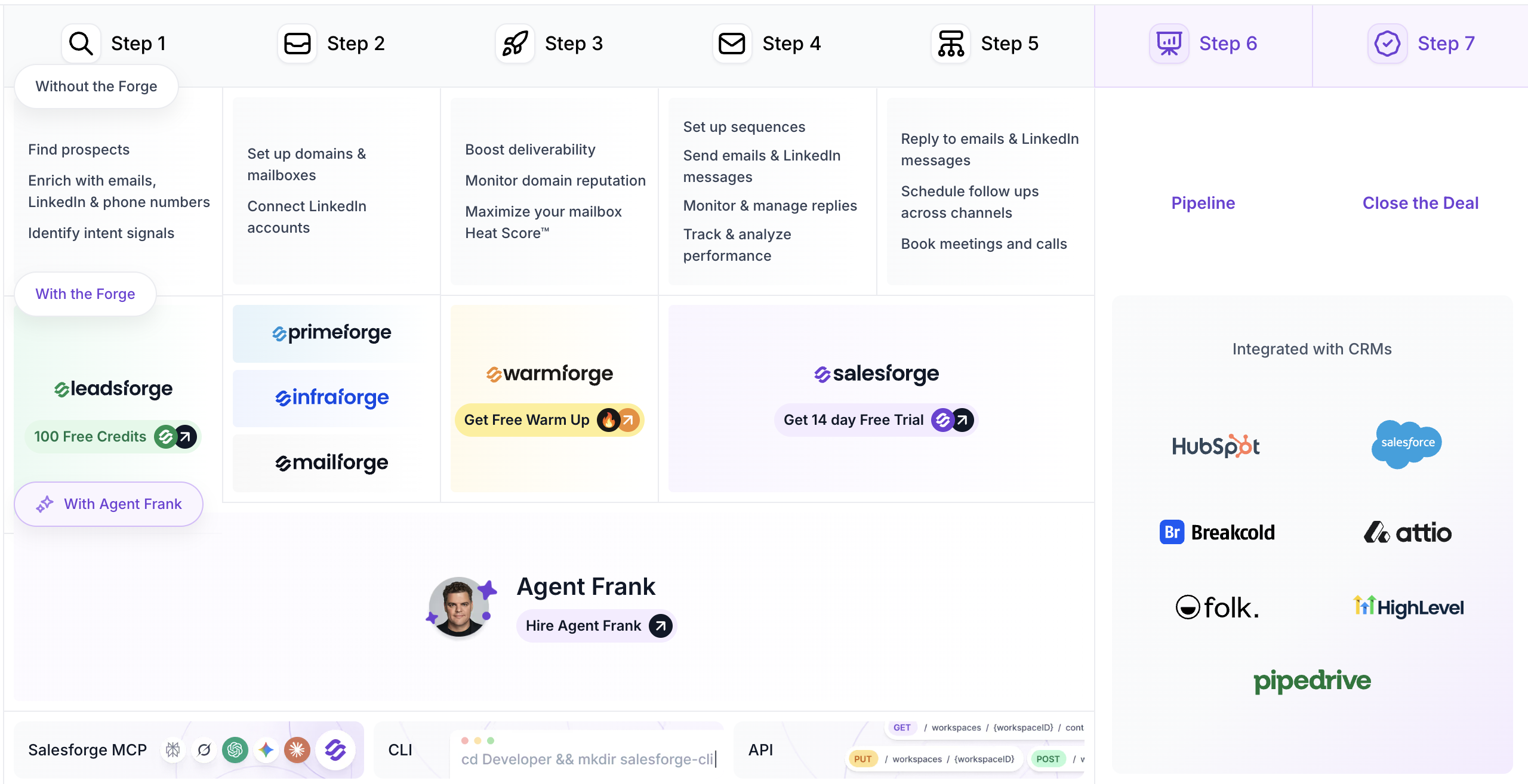
A typical outbound workflow looks like this:
Find your ideal prospects
Set up your email infrastructure
Warm up and monitor your mailboxes
Create and launch outreach campaigns
Manage replies and follow-ups
Connect your workflow to your CRM and other tools
Turn positive replies into meetings and pipeline
The Forge Stack gives you tools for each of these steps.
Leadsforge is the prospecting and lead enrichment layer of the Forge Stack.
Instead of manually building complex searches with dozens of filters, you can describe the type of companies and people you want to target in plain language.
For example:
Marketing managers at SaaS companies in the United States with 50 to 500 employees.
Leadsforge searches across more than 500 million contacts and uses waterfall enrichment to find the best available data.
You can use Leadsforge to:
Find prospects based on your ideal customer profile
Find companies similar to your existing customers
Find people following a specific company
Find companies based on business signals such as funding or acquisitions
Find local businesses from Google Maps
Enrich contacts with verified email addresses
Find LinkedIn profiles
Find mobile phone numbers
Identify intent signals
Qualify leads using custom prompts
Export leads to CSV
Send leads directly to Salesforge
Once your list is ready, you can send it directly to Salesforge and begin building your outreach campaign.
Before sending cold email at scale, you need reliable domains and mailboxes.
The Forge Stack provides three different infrastructure options:
Mailforge provides shared email infrastructure designed specifically for cold outreach.
It is a good option if you want a simple and cost-effective way to create large numbers of domains and mailboxes without managing the underlying infrastructure yourself.
Mailforge includes:
Automated DNS setup
SPF, DKIM and DMARC configuration
Bulk DNS updates
Domain transferring
SSL and domain masking
Multiple workspaces
Support for any sending software
API and MCP access
Mailforge uses shared infrastructure, making it particularly suitable for teams that want to get started quickly and scale their mailbox infrastructure without managing dedicated servers.
Infraforge provides private email infrastructure with dedicated IPs and greater control over the underlying setup.
It is designed for teams that need more control over their infrastructure and want to scale while maintaining a private sending environment.
Infraforge includes:
Dedicated IP infrastructure
Automated DNS setup
Bulk DNS updates
Multi-IP provisioning
Pre-warmed domains and mailboxes
SSL and domain masking
Multiple workspaces
Mailbox and infrastructure management
API and MCP access
Support for other sending software
Infraforge is generally a better fit for larger teams, agencies, and customers who need more control over their email infrastructure.
Primeforge provides real Google Workspace and Microsoft 365 mailboxes configured specifically for cold outreach.
This allows you to send from the same major email service providers that many of your prospects use.
Primeforge includes:
Google Workspace mailboxes
Microsoft 365 mailboxes
Pre-warmed mailboxes
Automated DNS setup
Domain and mailbox management
Profile pictures and GIFs
Bulk management
API and MCP access
Primeforge is particularly useful when you want to use Google or Microsoft infrastructure and benefit from ESP matching.
The three options serve different needs:
Mailforge: Shared infrastructure, simple and cost-effective
Infraforge: Private infrastructure, dedicated IPs and more control
Primeforge: Google Workspace and Microsoft 365 mailboxes
You can also combine infrastructure types. For example, you can use Primeforge for Google and Microsoft mailboxes while using Mailforge or Infraforge for additional infrastructure.
Salesforge can connect to mailboxes from all three Forge infrastructure products, as well as mailboxes you already own.
Once your mailboxes are ready, the next step is protecting their reputation.
Warmforge is the email deliverability layer of the Forge Stack.
It warms up your mailboxes by generating email activity between mailboxes in its warm-up network. This helps establish sender reputation before you begin sending significant volumes of cold outreach.
Warmforge also provides tools for monitoring mailbox health and checking where your emails are landing.
You can use Warmforge for:
Automated email warm-up
Mailbox health monitoring
Deliverability monitoring
Placement tests
Blacklist monitoring
DNS and MX checks
Ongoing reputation management
We recommend warming new mailboxes for at least two weeks before using them for cold outreach.
Once your mailboxes are warmed up, we recommend keeping warm-up running continuously rather than repeatedly turning it on and off.
Warmforge works with Google Workspace and Microsoft 365 mailboxes as well as SMTP/IMAP ones obtained from Mailforge/Infraforge, and Salesforge customers also receive free unlimited warm-up for supported mailboxes.
Salesforge is the sales execution layer of the Forge Stack.
Once you have your prospects and infrastructure ready, Salesforge is where you create campaigns and communicate with those prospects.
Salesforge supports multi-channel outreach across email and LinkedIn.
You can use it to:
Create email sequences
Create LinkedIn sequences
Personalize messages with AI
Send from unlimited mailboxes
Send from unlimited LinkedIn accounts
Create conditional multi-channel sequences
Schedule follow-ups
Manage replies
Track campaign performance
Analyze outreach results
Manage multiple workspaces
Connect to CRMs and other business tools
Salesforge also includes Primebox, which brings email and LinkedIn replies into one place. This makes it easier to monitor conversations and respond without switching between multiple inboxes and platforms.
Salesforge is designed to work alongside the rest of your sales stack.
You can connect Salesforge with tools such as:
HubSpot
Salesforce
Pipedrive
Attio
Breakcold
Folk
HighLevel
Slack
Clay
Zapier
You can also use webhooks and the Salesforge API to connect Salesforge with custom applications and internal workflows.
This allows you to keep your existing CRM and sales processes while using Salesforge as the execution layer for your outbound campaigns.
If you want to automate more of the outbound process, Agent Frank is the AI SDR layer of the Forge Stack.
Agent Frank can handle much of the work normally performed by an SDR, including:
Finding prospects
Building prospect lists
Enriching contacts
Creating personalized outreach
Sending emails
Following up
Managing conversations
Booking meetings
Agent Frank can operate in Auto-Pilot or Co-Pilot mode depending on how much control you want over his work.
You provide Agent Frank with information about your company, products, services, target customers, messaging, and tone. He then uses that information when researching prospects and creating outreach.
Agent Frank can use the Forge Stack to handle the underlying workflow:
Leadsforge finds and enriches prospects
Your email infrastructure provides the mailboxes
Warmforge handles email warm-up and deliverability
Salesforge manages the outreach and conversations
Agent Frank coordinates the process and works toward booking meetings
You can also connect your own infrastructure if you prefer.
The Forge Stack is not limited to the interfaces provided by the individual products.
Several Forge products provide API and MCP access, allowing you to integrate them into your own systems and workflows.
Salesforge MCP allows AI assistants and other MCP-compatible applications to interact with Salesforge.
This can be useful for building AI-powered workflows around prospecting, outreach, campaign management, and sales operations.
The Forge Stack APIs allow developers to integrate products directly into their own applications.
For example, you can build workflows that:
Create and manage mailboxes
Manage domains
Import or export leads
Trigger outreach
Retrieve campaign information
Connect Salesforge to internal systems
Automate infrastructure management
You do not have to use the entire Forge Stack.
For example:
Using your own leads
You can import your own prospect list into Salesforge and use Salesforge for outreach without using Leadsforge.
Using your own mailboxes
You can connect mailboxes you already own to Salesforge instead of purchasing infrastructure from Mailforge, Infraforge, or Primeforge.
Using external sending software
Mailforge and Infraforge can also be used with other sending platforms. You are not required to use Salesforge as your sending software.
Using Salesforge without Agent Frank
Salesforge can be used entirely for human-led outreach. Agent Frank is optional.
Using Agent Frank with your existing stack
Agent Frank can work with your existing domains and mailboxes, or you can use the infrastructure provided through the Forge Stack.
The main idea is simple:
Leadsforge helps you find the right people.
Mailforge, Infraforge, and Primeforge provide the infrastructure to send from.
Warmforge helps protect and monitor mailbox deliverability.
Salesforge runs your email and LinkedIn outreach.
Agent Frank can automate the whole process
MCP and API let you connect and automate the stack with your own systems.
Together, these products give you a complete outbound workflow from prospect discovery to outreach and pipeline generation, while still allowing you to choose which parts of the stack you actually need.
