
The sequences table can be customized by choosing which columns are visible. This allows you to tailor the table to your workflow and focus on the information that's most relevant to your outreach.
Where to find it
Open Salesforge.
Navigate to the Sequences tab.
Locate the column customization icon in the Sequences table toolbar.
Select the columns you want to display or hide.
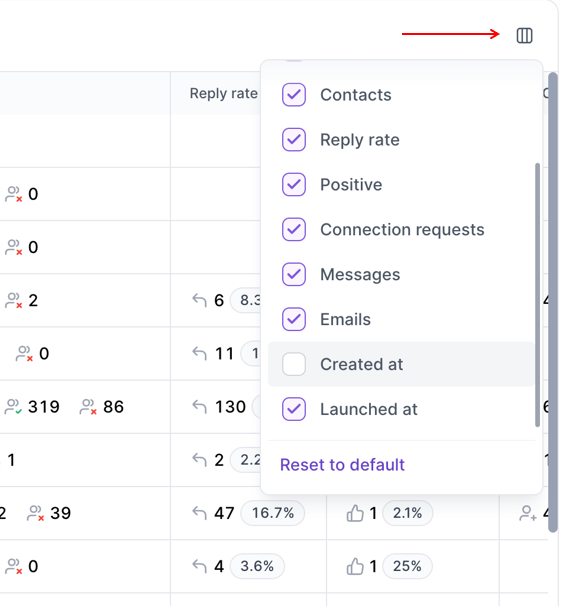
In the Sequences table, you can customize which columns are displayed or hidden, including but not limited to senders, contacts, reply rates, email addresses, launch dates, creation dates, and sequence priority.
Different sequence types display different performance metrics. For example, when running Email-only, LinkedIn-only, or Multichannel sequences, you may not need to see every available column. With this column visibility feature, you can hide unnecessary columns to create a cleaner, more focused view.
Customizing your table can help you:
Reduce visual clutter by hiding unused columns.
Focus on the metrics that matter most to your workflow.
Create a more personalized experience when managing sequences.
Your selected column visibility settings are saved, so the Sequences table will continue to display your preferred layout until you make further changes.