
Make it easier for recipients to unsubscribe by displaying opt-out links in their preferred language. The Localized Opt-Out Link feature automatically generates a localized unsubscribe link, creating a more user-friendly experience for global audiences.
By providing clear opt-out options in the recipient's language, you can help improve email engagement and support better deliverability practices.
How It Works
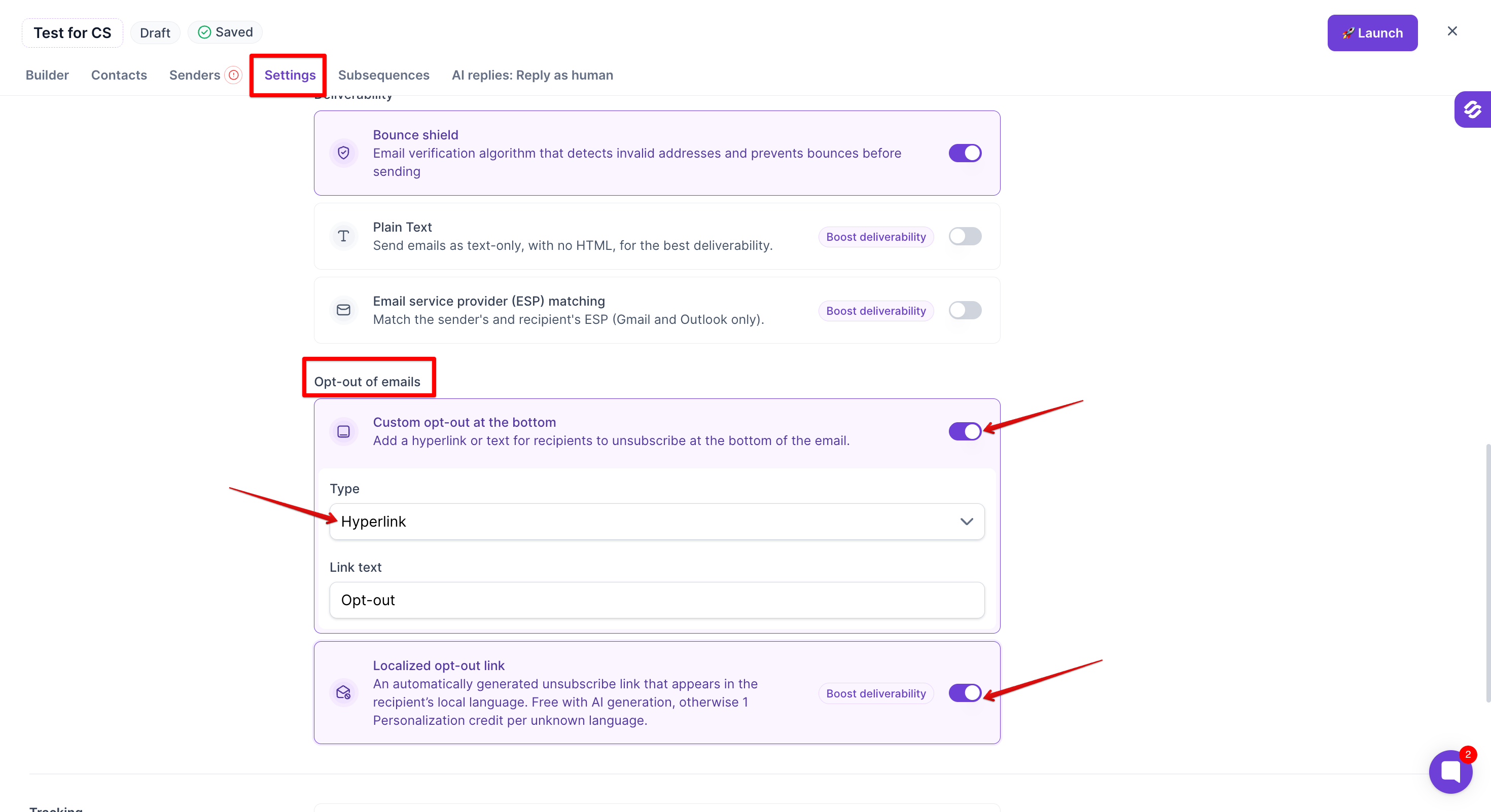
The Localized Opt-Out Link feature is available within the Opt-out of emails settings in Multichannel Sequences.
When enabled, the unsubscribe link included in your emails is automatically localized based on the recipient's language whenever supported.
How to Enable Localized Opt-Out Link
Open your Multichannel Sequence.
Navigate to the Opt-out of emails section.
Enable Custom opt-out at the bottom.
Under Type, select Hyperlink.
The Localized Opt-Out Link option will appear below the custom opt-out settings.
Enable the Localized Opt-Out Link toggle.
Save your changes.
Personalization Credit Usage
Credit consumption depends on how your message is generated:
AI-generated messages: No additional personalization credits are required.
Non-AI messages: 1 personalization credit is consumed per message when the localized opt-out link is used.
Benefits
Display unsubscribe links in the recipient's preferred language.
Create a more localized and user-friendly email experience.
Support better email deliverability practices.
Reduce friction for international audiences.
Important Notes
Localized Opt-Out Link is only available when Custom opt-out at the bottom is enabled and the Type is set to Hyperlink.
If the opt-out Type is set to Text, the Localized Opt-Out Link option will not be displayed.
The unsubscribe link is generated automatically and localized when supported for the recipient's language.
The feature can be enabled or disabled at any time using the dedicated toggle.
Use Localized Opt-Out Link to provide a clearer unsubscribe experience for recipients while enhancing the quality of your email outreach.